How resellers track profit and old stock in a spreadsheet
If you buy second-hand items to resell, you probably know the feeling: you sold something last week, but you are not sure what you made on it, and a coat you bought two months ago is still in the closet. A simple spreadsheet answers both questions. This guide shows what a reseller's spreadsheet needs, and a routine that keeps it up to date in a few minutes a week. It is general bookkeeping for your own records, not tax or accounting advice.
What to record for every item
One row for each item is the most useful rule. For each one, write down:
- What it is, and the category you use for it.
- When you bought it, and what you paid.
- Where it came from: a trip, a sale, a bundle. More on that below.
- Which channel you listed it on, and the date you listed it.
- The list price.
- When it sold, the sale price and any shipping you charged.
- The costs of selling: the channel's fees, your shipping cost, and any other cost, such as packaging.
You need the purchase date and cost on day one, so record them when you bring the item home. The other columns fill in as the item moves along.
Work out net profit the same way every time
Choose one formula and use it for every sale. A clear one: net profit is what the buyer paid you (sale price plus shipping you charged), less the channel's fees, less your shipping cost, less what you paid for the item, less any other cost. Return on investment is the net profit divided by what you paid for the item.
Fees are the part people forget. Each channel charges a percentage and often a fixed amount, and the two together change your margin more than most people expect. Put each channel's percentage and fixed fee in one place, and let the spreadsheet calculate the fee for each sale, so you do not do it by hand.
Group items by buying trip
A "haul" is a buying trip: a morning at several sales, a bag from one source, a lot you bought at once. Give each trip an ID and use that ID on every item bought on it. Then you can see, for each trip, how many items you bought, how many are sold, how much you spent, what you earned, and whether the trip has paid for itself yet. A trip is paid back when the profit from its sold items covers the cost of the items still unsold.
This tells you which sources are worth going back to.
Watch the age of your stock
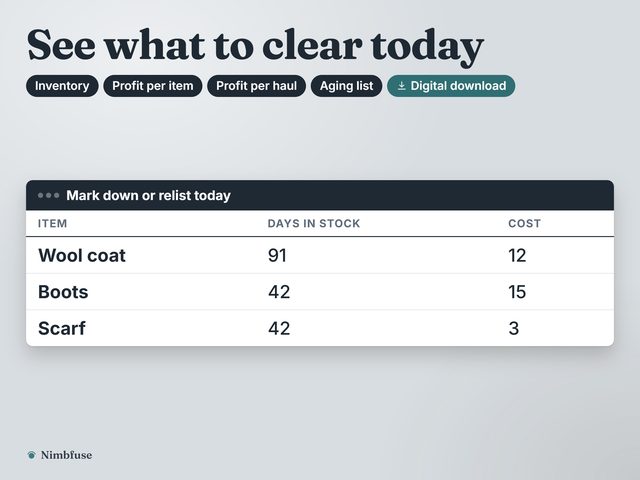
Old stock is money sitting in a box. Track how long each unsold item has been in stock, counting from the day you bought it. Group the unsold items into age bands, for example 0 to 30 days, 31 to 60, 61 to 90, and over 90. A glance at the bands shows how much of your money is in slow stock.
Then pick a threshold, the number of days after which an unsold item deserves a look, and keep a short list of the items that have passed it, longest in stock first. The list does not decide for you. It is a prompt: look at the price, the photos and the listing, and decide whether to mark it down, relist it or do something else.
A routine that takes a few minutes
1. When you buy: add the trip and its date, then each item with the trip's ID, the date and the cost. 2. When you list: add the channel and the listing date. 3. When something sells: add the sale date, the sale price and the shipping amounts. The fee and the net profit calculate. 4. Once a week: look at the list of old items and decide what to do with each one. 5. Once a month: look at your monthly totals: how many items sold, the revenue, the fees and the net profit.
Check that your dates, amounts and trip IDs match your own records. A spreadsheet that you type into is only as good as what you put in it.
Keep it simple
You do not need macros, a connection to a marketplace, or dozens of columns. A manual spreadsheet that you update on a schedule is a better habit than a clever one that you stop using. Save a separate copy before you enter your own stock, and keep a backup.
A tracker that does this
Nimbfuse has a Reseller Inventory Spreadsheet and Profit Tracker for Microsoft Excel and LibreOffice. It follows each item from purchase through sale, with fees, net profit, ROI and stock aging, groups items by haul, and keeps an Action List of up to 15 unsold items past your threshold. There are tabs for Inventory, Hauls, Monthly and a Dashboard, and a Settings tab for six channels and their fees. The download has a sample workbook with ten fictional rows, a blank workbook, a start guide and a page of 8 printable haul bin labels. It is manual entry: there is no marketplace sync, no macros, no tax fields and no accounting advice. It is a digital download on our Etsy shop, and the product page is on this site.